Variants without a SKU
Every variant needs a SKU for inventory, fulfillment apps, and feeds. Missing ones are listed by product and variant.
Shopify catalog audit
SKU & GTIN Doctor mirrors your Shopify products and inventory, runs catalog checks every day, and gives you one list of what to fix, with the evidence for each finding.
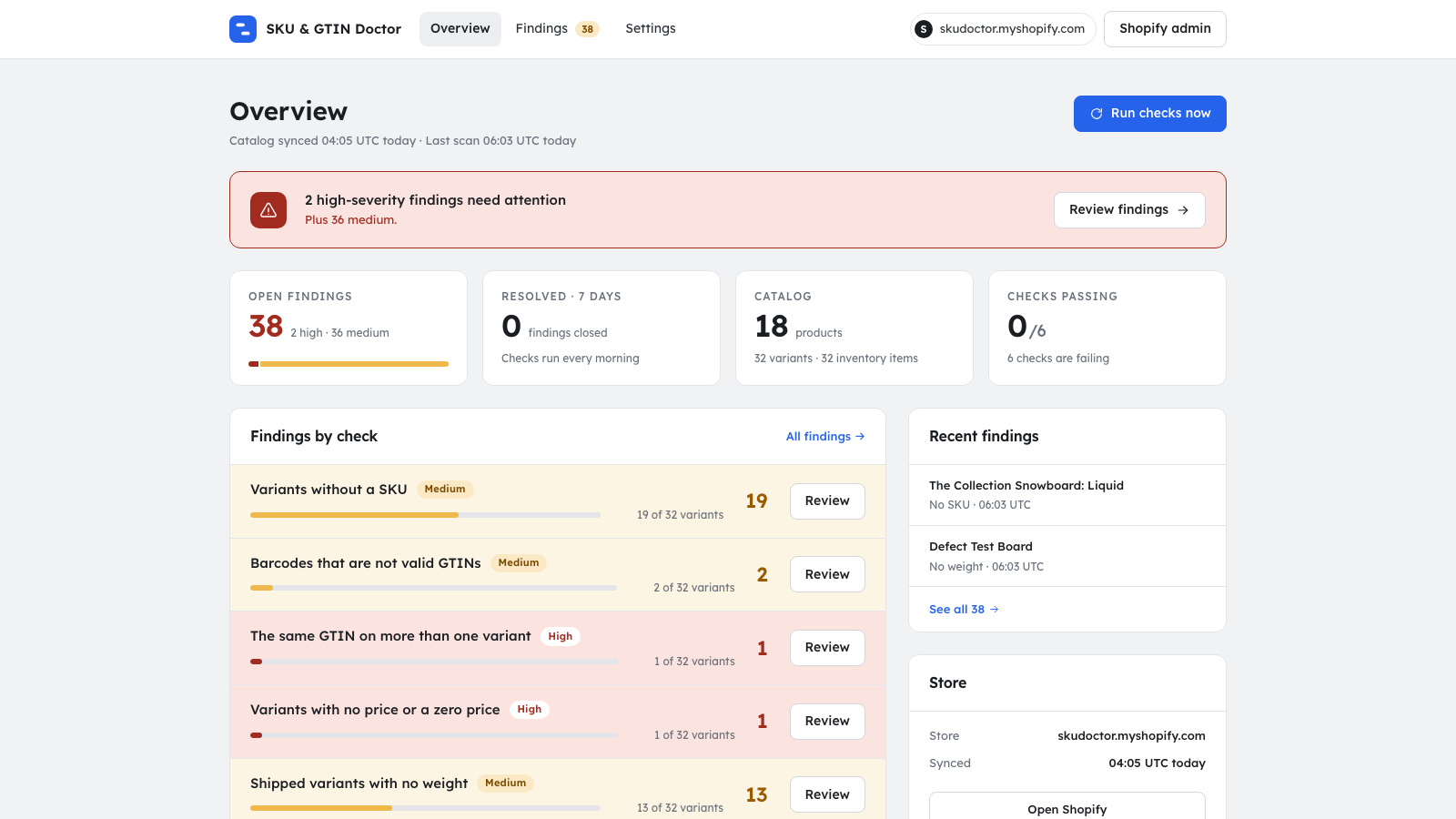
Each finding names the product and variant, shows the evidence, and stays open until it is fixed or you snooze it.
Every variant needs a SKU for inventory, fulfillment apps, and feeds. Missing ones are listed by product and variant.
Wrong length or a failed check digit means Google Shopping and marketplaces reject the listing. Each bad barcode is called out.
Duplicate GTINs get products disapproved and confuse channel sync. You see every variant that shares one.
A zero price sells the item for free. A missing price hides it. Both are flagged the day they appear.
Weight-based rates need a weight. Physical variants without one are listed before they break checkout.
Published products with no image are found so they never reach a channel that way.
Google Merchant Center disapproves products whose main image is under 500x500 from 2027-01-31. Pro lists each product, the main image as an error and any additional image as a warning, measured on the original upload.
Free shows one count of the products whose main or additional images are under 500x500, so you know the size of the problem before the deadline.
Install in a minute. The first scan runs the next morning.
The app asks for read-only access to products and inventory. No orders, no customers.
Webhooks apply every product and inventory change as it happens. A full reconcile runs nightly.
Resolve them, snooze them, export a CSV, or let your AI agent read them over MCP.
Free covers small catalogs. Pro runs every check on any catalog. Billed through Shopify.
$0 /month
$9 /month, 7-day free trial
Ask about your findings from the assistant you already use. Shopify Sidekick reads them inside the Shopify admin. Other AI assistants connect over MCP, the open protocol assistants use to call tools.
Sidekick is the AI assistant in your Shopify admin. Ask it about your catalog and it answers from the app's findings, with links that open each finding in the app. It asks your permission the first time, and there is nothing to set up.
Sidekick only reads findings; it cannot change your store or a finding's status. Each answer carries up to 10 findings, and your store needs Sidekick.
How Sidekick worksSign in once in your browser; there is no API key.
Ask for a summary, the most severe open findings, or the evidence and fix link for one.
Search the mirrored catalog by title, SKU, or barcode and read every variant of one product.
Check any UPC or EAN against the GTIN rules, with the check digit it should have.
Mark a finding resolved, snooze it, or reopen it, and re-run the checks to see what is new.
https://skudoctor.agntwrk.com/mcpclaude mcp add --transport http skudoctor https://skudoctor.agntwrk.com/mcpWorks with Claude Code, Claude Desktop, web, and mobile, ChatGPT, Codex, Gemini, Grok, Cursor, VS Code.
Install steps for each assistantOver MCP, assistants read your catalog and findings and can change a finding's status in this app. They cannot change your Shopify store.
It checks your active Shopify products every day for variants without a SKU, barcodes that are not valid GTINs, the same GTIN on more than one variant, variants with no price or a zero price, shipped variants with no weight, products with no image, and images under 500x500. Each finding names the product and variant and shows the evidence.
A GTIN is the number behind a barcode (UPC, EAN, or ISBN-13). It must be 8, 12, 13, or 14 digits long and end in a check digit calculated from the other digits. Google Merchant Center and marketplaces validate that digit, so a listing whose GTIN fails it, or whose GTIN is shared by two variants, can be disapproved or merged with another.
Read-only access to products and inventory, through the Shopify scopes read_products and read_inventory. It does not request orders or customer data.
No. The app only reads from Shopify and has no permission to write products, prices, or inventory. Resolving or snoozing a finding changes its status inside the app, not in your store.
Checks run once a day. Webhooks apply product and inventory changes to the app's copy of your catalog as they happen, and a full reconcile runs nightly. You can also start a scan from the dashboard.
Free covers up to 50 products with the SKU, invalid GTIN, duplicate GTIN, and small-image count checks. Pro is $9 per month with a 7-day free trial, runs every check on any catalog size, and includes MCP access for AI assistants. Billing goes through Shopify.
Yes. On stores where Sidekick is available, ask it in your Shopify admin, for example "What's wrong with my catalog?" or "Which products have invalid barcodes?". Sidekick asks your permission, then answers from the app's findings and links to each one. It only reads: it cannot change your store or a finding's status, and each answer carries up to 10 findings. Nothing to set up. Details are at https://skudoctor.agntwrk.com/docs/sidekick.
Uninstalling deletes the store's data, sessions, and findings, normally within 48 hours. A Shopify data erasure request does the same.
Yes. The app runs an MCP server at https://skudoctor.agntwrk.com/mcp that works with Claude, ChatGPT, Codex, Gemini, Grok, Cursor, VS Code, and other MCP clients. Add it as a connector, sign in in your browser, and ask for your findings, a product, or a barcode check. Per-client steps are at https://skudoctor.agntwrk.com/docs/mcp.
Read-only access. Uninstalling removes everything the app stored.